











Buying Advice
Monitor Resolution Explained: Full HD, QHD & 4K
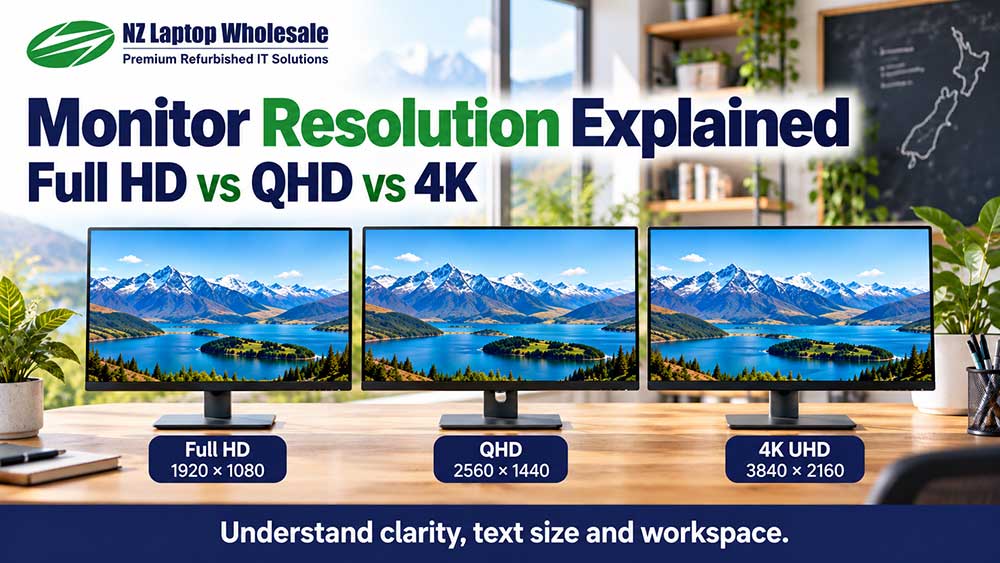
Monitor resolution tells you how many pixels make up the picture on your screen. Full HD, QHD and 4K monitors contain different numbers of pixels, which affects detail, text clarity and how much content you can comfortably fit on the display.
However, a higher resolution is not automatically the best purchase for every setup. Screen size, display scaling, your computer’s capabilities and the work you do all influence the right choice.
For everyday home, study and office use, the aim is to choose a display that makes your normal tasks comfortable without paying for features you do not need.
What is monitor resolution?
A screen is made up of tiny picture elements called pixels. Resolution describes how many pixels run across the screen and how many run from top to bottom.
For example, 1920 × 1080 means the display has 1,920 pixels across and 1,080 pixels down.
This is commonly called Full HD or 1080p.
Resolution is different from physical screen size. A 24-inch monitor and a 27-inch monitor can both have a resolution of 1920 × 1080, even though one screen is physically larger.
Full HD, QHD and 4K compared
| Name | Resolution | Total pixels | Practical use |
|---|---|---|---|
| Full HD / 1080p | 1920 × 1080 | Approximately 2.1 million | Everyday home computing, study and office work |
| QHD / 1440p | 2560 × 1440 | Approximately 3.7 million | More workspace or finer detail, particularly on larger screens |
| 4K UHD / 2160p | 3840 × 2160 | Approximately 8.3 million | Fine detail, sharp text with suitable scaling and demanding visual work |
These are common 16:9 resolutions, rather than a complete list. Some business monitors use taller formats such as 1920 × 1200, while ultrawide screens use different dimensions again.
Check the actual pixel dimensions in the product listing rather than relying only on a marketing label.
Is Full HD good enough for everyday use?
For many people, yes. Full HD remains a practical resolution for email, web browsing, Microsoft 365, accounting, schoolwork and general home computing.
On a 21.5-inch to 24-inch monitor, it can provide a useful balance of readable text, picture detail and value.
If you mainly work in one application at a time, there may be little reason to choose a higher resolution simply because it is available.
The limitation becomes more noticeable when you want several windows visible at once, work with large spreadsheets or prefer particularly fine text and image detail.
What does QHD offer over Full HD?
QHD has 2560 × 1440 pixels, compared with Full HD’s 1920 × 1080.
That is approximately 78% more pixels overall.
At the same display scaling, QHD provides more room for applications, spreadsheet columns, documents and side-by-side windows.
It can be a useful option for people who spend much of the day switching between information or comparing documents.
On a 27-inch screen, QHD also has a higher pixel density than Full HD, allowing finer detail at the same viewing distance.
Whether you use those extra pixels for more workspace, larger text with improved detail, or a mixture of both depends on your display settings.
What does a 4K monitor offer?
A typical 4K UHD monitor has 3840 × 2160 pixels: twice as many across and twice as many down as Full HD.
That gives it four times the total pixel count.
Those extra pixels can produce finer detail and smoother-looking text, particularly when the screen is used at its native resolution with suitable display scaling.
However, four times the pixels does not necessarily mean four times the usable workspace. On many desktop-sized 4K monitors, you will increase scaling so text and controls remain comfortable to read.
A 4K monitor also needs a computer output, cable and any adapter or dock capable of supporting your intended resolution and refresh rate.
Does a bigger monitor have a higher resolution?
Not necessarily.
A 27-inch Full HD monitor has the same number of pixels as a 24-inch Full HD monitor. Those pixels are simply spread across a larger physical area.
At the same scaling, the larger monitor shows approximately the same amount of content, with physically larger text and icons.
This can suit someone who wants a bigger picture. It does not automatically provide more spreadsheet columns or additional room for windows.
For help comparing physical sizes, read our monitor screen-size guide.
What is pixel density?
Pixel density describes how closely packed the pixels are, usually measured in pixels per inch, or PPI.
At the same resolution, a smaller screen has a higher pixel density. At the same physical size, a higher-resolution screen has a higher pixel density.
This helps explain why a Full HD laptop display can look more detailed up close than a much larger Full HD monitor.
However, viewing distance matters too. You may notice individual pixels more easily when sitting close to a large, lower-resolution screen than when viewing it from further away.
Will a higher resolution make text too small?
It can if you keep the same scaling on a screen of the same size.
However, you do not have to use tiny text just because your monitor has more pixels.
Display scaling increases the size of text, icons and interface elements while allowing the screen to keep using its native resolution.
For example, a 4K display set to 200% scaling provides approximately the same logical workspace as Full HD at 100%, while using more pixels to draw supported text and interface elements.
Browser zoom and application-specific settings can also make documents and websites easier to read.
Some older applications do not handle scaling as well as newer software, so results can vary.
What is native resolution?
An LCD monitor has a fixed physical grid of pixels. Its native resolution matches that grid.
For example, a Full HD monitor normally has a native resolution of 1920 × 1080.
Using the native resolution generally gives the clearest desktop picture because the computer’s output matches the screen’s pixel layout.
If you select a lower resolution, the monitor may need to stretch the picture to fill the screen. Text and fine detail can look softer as a result.
If text is too small, try increasing display scaling or text size before reducing the resolution.
Does resolution affect computer performance?
Higher resolutions mean more pixels for the computer to output and, where relevant, render.
For documents, email and ordinary desktop work, the first question is whether your computer supports the display settings you want.
Gaming, 3D applications and other graphics-heavy workloads can place much greater demands on graphics hardware as resolution increases.
A computer that comfortably runs office applications on a 4K monitor may still struggle to run demanding games at 4K.
Physical screen size alone does not create this extra workload. A 24-inch Full HD monitor and a 27-inch Full HD monitor have the same pixel count.
Can my laptop or desktop run a higher-resolution monitor?
Check the complete connection rather than assuming that a familiar-looking socket supports every display setting.
The relevant limits can include:
- The computer’s graphics hardware
- The capabilities of its particular display output
- The cable
- Any adapter or docking station
- The monitor’s input
- The number of displays connected at the same time
Resolution and refresh rate should be checked together. Equipment that supports 4K at a lower refresh rate may not support 4K at the higher refresh rate you want.
A dock may also have different limits when running two or more monitors compared with one.
Is resolution the same as refresh rate?
No. Resolution describes the number of pixels. Refresh rate describes how many times per second the monitor can update its picture, measured in hertz, or Hz.
A 60Hz monitor refreshes up to 60 times per second.
Higher refresh rates can make movement feel smoother, but they do not increase the number of pixels or automatically improve colour accuracy.
For everyday office tasks, consider readability, suitable resolution, stand adjustment and connections alongside refresh rate.
Does higher resolution mean better colour?
No. Resolution describes detail, rather than colour accuracy.
Panel quality, colour gamut, calibration, brightness, contrast and viewing angles are separate considerations.
A 4K monitor is not automatically suitable for professional photo editing simply because it has a high pixel count.
If accurate colour is important to your work, check those specifications separately.
What resolution should you choose?
For everyday home use and study
A Full HD monitor can be a practical choice for browsing, documents, online learning and general computing, particularly at around 22 to 24 inches.
For office work and multitasking
Full HD can suit straightforward administration and single-application work. QHD is worth considering when you want more room for spreadsheets, documents or several windows on one screen.
For a larger picture
A larger Full HD monitor can suit someone who wants physically larger text and interface elements at the same scaling. Check that you are comfortable with its pixel density at your normal viewing distance.
For fine detail and sharp text
A higher-resolution monitor with suitable scaling may be useful. Check that your computer supports it and that the applications you use handle scaling well.
Frequently asked questions
Is 1080p the same as Full HD?
For the common widescreen monitors discussed here, yes. Full HD normally refers to 1920 × 1080, also commonly called 1080p.
Is QHD the same as 4K?
No. QHD is usually 2560 × 1440, while 4K UHD is 3840 × 2160. A 4K UHD monitor contains substantially more pixels.
Is a 27-inch Full HD monitor bad?
No. It can suit everyday use and people who prefer a larger picture. Compared with a 27-inch QHD monitor, it has lower pixel density and less workspace at the same scaling.
Can a 4K monitor display Full HD content?
Yes. A 4K monitor can display lower-resolution content, but it cannot recover detail that was not present in the original image or video.
Why does my monitor look blurry?
Possible causes include using a non-native resolution, application scaling behaviour, an analogue connection or unsuitable display settings. Start by checking the monitor’s native resolution and the computer’s output settings.
Will a higher-resolution monitor fix small text?
Not by itself. Text size also depends on physical screen size and scaling. Adjust scaling, text settings or browser zoom to make content comfortable to read.
Our practical recommendation
Choose resolution and screen size together. Full HD can provide excellent everyday value, QHD can offer useful extra workspace, and 4K can deliver finer detail with suitable hardware and scaling.
The best option is the one that makes your normal work comfortable and fits your computer, desk and budget.
Browse our refurbished monitors available throughout New Zealand, or contact NZ Laptop Wholesale if you would like help choosing a suitable display.
Pair the Right Resolution With the Right Screen Size
Compare 22-inch, 24-inch and 27-inch monitors, and work out which size suits your desk, viewing distance and everyday tasks.
Read Our Monitor Size Guide


