











Interactive Displays & Digital Whiteboards NZ
Affordable interactive touchscreens for New Zealand schools, businesses, meeting rooms, training facilities and community organisations.
Our range of refurbished and ex-lease interactive displays gives you a practical alternative to the cost of buying a brand-new commercial touchscreen. Use them for presentations, digital whiteboarding, classroom learning, meetings, training, collaboration and more.
NZ Laptop Wholesale is based in Auckland and supplies professionally refurbished IT equipment throughout New Zealand. Browse our current interactive displays below, or contact us if you need help choosing a screen for your room or setup.
Interactive Displays Currently Available
Our stock changes regularly depending on the commercial and ex-lease equipment available to us. Check the individual product listings for exact specifications, touchscreen features, connectivity, accessories and condition.
Interactive Displays
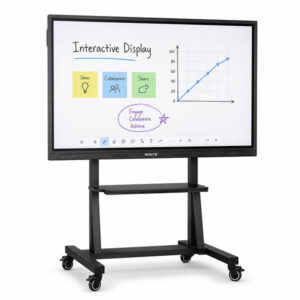
Insite 65″ 4K Interactive Touchscreen Whiteboard with Stand | Android 11
Interactive Displays

Interactive Displays
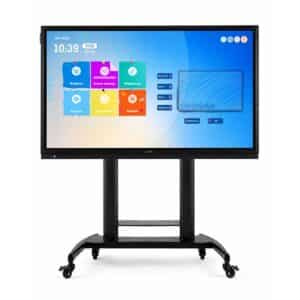
Newline 75″ 4K Interactive Touchscreen Whiteboard with Stand | Android 8
Interactive Displays
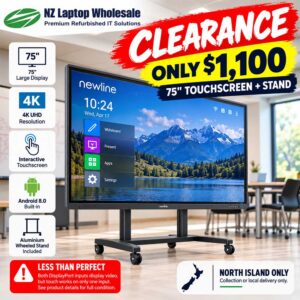
Newline 75″ 4K Interactive Touchscreen Whiteboard + Stand | Less Than Perfect
What Is an Interactive Display?
An interactive display is a large touchscreen designed for presentations, collaboration and shared spaces. Instead of simply displaying an image like a conventional television or monitor, an interactive touchscreen allows you to control and interact with content directly on the screen.
Depending on the model, you may be able to write, draw, annotate documents, navigate websites, control presentations or interact with compatible software using your finger or a supported stylus.
You may also see these products described as:
- Interactive whiteboards
- Digital whiteboards
- Interactive touchscreens
- Interactive flat panel displays
- Touchscreen whiteboards
- Electronic whiteboards
- Smart boards
While SMART Board is a particular brand of interactive display, the term “smart board” is also commonly used when people are looking for large interactive touchscreen displays.
Interactive Displays for Schools & Classrooms
Interactive displays are particularly well suited to classrooms and educational environments because teachers and students can interact directly with the information being shown.
Rather than presenting from a computer at the side of the room, a teacher can work directly from the touchscreen while displaying lesson material, websites, presentations, diagrams, videos and other digital resources.
An interactive touchscreen can be useful for:
- Primary and secondary school classrooms
- Tertiary education
- Training rooms
- Staff rooms
- Libraries
- Learning centres
- Community education facilities
For schools working within a limited technology budget, a refurbished interactive display can also provide access to commercial-grade equipment without automatically having to purchase the latest generation of hardware.
Interactive Displays for Meeting Rooms & Businesses
Interactive touchscreens are also a great fit for meeting rooms, boardrooms and collaborative workspaces.
Connect a compatible laptop or computer and the display can become a large shared workspace for presentations, documents, diagrams, planning sessions and brainstorming.
Instead of having one person controlling everything from a laptop at the end of the table, users can interact directly with the information being displayed at the front of the room.
Interactive displays can work particularly well in:
- Meeting rooms
- Boardrooms
- Training facilities
- Workshops
- Project planning rooms
- Sales presentations
- Staff training
- Conference spaces
When the touchscreen isn’t required, many interactive displays can still be used as a large presentation screen when connected to a compatible computer or media source.
Interactive Displays for Clubs & Community Organisations
Large interactive displays aren’t limited to schools and corporate offices.
Sports clubs, community organisations, churches, training providers and other organisations often need a large screen for presentations, notices, meetings and training without needing to invest in an expensive brand-new enterprise display.
A single interactive panel can potentially perform several roles within the same room, including presentations, digital whiteboarding, training material, meetings and general information displays.
Interactive Display vs Projector
The traditional setup in many classrooms and meeting rooms has been a projector connected to a computer, often with a separate whiteboard nearby.
An interactive display combines much of this functionality into a single large touchscreen.
Because the picture is produced directly by the screen rather than projected across the room, there is no projector beam to stand in front of while presenting. Users can also interact directly with the content instead of continually returning to the computer controlling the presentation.
Projectors can still make sense where a very large image is required, but for many classrooms, meeting rooms and training spaces, an interactive touchscreen provides a much more direct way to work with onscreen information.
Digital Whiteboard or Interactive Display?
The terminology around these products can be confusing because different manufacturers use different names.
A digital whiteboard generally describes the ability to write, draw, annotate and collaborate digitally.
An interactive display describes the physical touchscreen panel itself.
In practice, the same device can often perform both jobs. An interactive touchscreen may be used as a digital whiteboard during a planning session, as a presentation screen during a meeting, and then as a conventional large display connected to a computer.
The exact functionality depends on the hardware, operating system and software supported by the individual display.
What Size Interactive Display Do I Need?
Large interactive panels are available in several different screen sizes. The right option will depend on the size of the room, viewing distance and how the screen will be used.
55-Inch Interactive Displays
A 55-inch interactive display can work well in smaller meeting rooms, training spaces or areas where users are relatively close to the screen.
65-Inch Interactive Displays
A 65-inch interactive display provides additional working space and can be a practical size for many classrooms, meeting rooms and collaborative environments.
75-Inch Interactive Displays
A 75-inch interactive display provides a much larger presentation and working area, making it better suited to bigger classrooms, meeting spaces and situations where information needs to remain visible from further away.
Before choosing a screen, consider:
- The overall size of the room
- How far people will sit from the screen
- The typical number of viewers
- Whether users will regularly write on the screen
- Available wall or floor space
- Mounting requirements
- Display resolution
- Connectivity with your existing computers
If you’re unsure, talk to our team about the room and how you intend to use the display.
Connecting a Laptop or Computer
Many interactive displays can be connected to an external laptop or desktop computer, allowing the touchscreen to become part of your normal Windows workspace.
The exact connection method varies between models. Some setups use one connection for the video signal and a separate USB connection to send touchscreen input back to the computer. Other displays may provide different connectivity options.
For this reason, it’s important to check the specifications of the individual interactive display rather than assuming every screen connects in exactly the same way.
If you’re purchasing a display for a particular laptop, desktop or meeting-room computer, contact us and we can help you check compatibility.
Built-In Android vs a Windows Computer
Some interactive displays include a built-in Android operating system that allows certain functions to be used without connecting a separate computer.
This can be convenient for basic whiteboarding, presentations and compatible applications.
For organisations that rely on Windows applications, Microsoft Office, browser-based services or specialist software, connecting a Windows laptop or desktop may provide a more familiar and flexible working environment.
Older ex-lease interactive displays may also have an earlier version of their built-in operating system. This doesn’t necessarily prevent them from being useful as large interactive displays when connected to an external computer.
Check the individual product listing for the exact configuration of the display you’re considering.
What to Look for When Buying an Interactive Display
Screen Size
Choose a display that suits both the physical room and the typical viewing distance.
Resolution
A higher-resolution screen can make documents, spreadsheets, diagrams, websites and detailed presentation material easier to view.
Touch Functionality
Check the touchscreen functionality of the individual model, particularly if you intend to use it regularly for writing, drawing or collaborative work.
Computer Connectivity
Consider the laptops or desktop computers that will connect to the screen and the video and touchscreen connections they require.
Built-In Operating System
Some interactive displays can perform certain tasks independently, while others are designed primarily to work with an external computer.
Stand or Wall Mount
Large interactive displays can be substantial pieces of equipment. Check the individual product listing to see what mounting equipment or stands are included with the unit being sold.
Why Buy a Refurbished Interactive Display?
Large commercial interactive displays can represent a significant investment when purchased new.
Professionally refurbished and ex-lease equipment provides another option for organisations that need the functionality of a commercial touchscreen without necessarily needing the newest model available.
At NZ Laptop Wholesale, we specialise in refurbished and ex-lease IT equipment. Products are tested and cleaned before sale, helping give useful commercial technology another working life.
For schools, businesses, clubs and community organisations, this can be a practical way to stretch an IT or AV budget further.
Our refurbished equipment is also backed by our warranty, with real local support available from our Auckland team.
Buying an Interactive Display in New Zealand
NZ Laptop Wholesale is based in Rosedale on Auckland’s North Shore and supplies refurbished IT equipment to customers throughout New Zealand.
If you’re in Auckland and would prefer to discuss an interactive display before purchasing, you’re welcome to contact our team.
For customers elsewhere in New Zealand, we offer nationwide delivery. Because large interactive displays are considerably heavier and more difficult to transport than standard desktop monitors, freight requirements can vary depending on the individual screen and destination.
Our interactive display stock is sourced from refurbished and ex-lease equipment, so available models and quantities can change regularly.
Interactive Display FAQs
Can I use an interactive display like a normal monitor?
In many cases, yes. An interactive display can accept a video signal from a compatible computer and operate as a large display. Touch functionality may require an additional connection depending on the particular model.
Can I write directly on an interactive display?
Interactive displays are designed to accept touchscreen input. Exact functionality, including stylus support and the number of supported touch points, varies between models.
Is an interactive display the same as a digital whiteboard?
The terms overlap. Interactive display generally refers to the touchscreen hardware, while digital whiteboard generally describes using the screen and compatible software for writing, drawing and collaboration.
Is an interactive display the same as a SMART Board?
SMART Board is a specific brand of interactive display. Other manufacturers also produce large interactive touchscreen displays with similar applications.
Do your interactive displays include a stand?
This varies between products. Check the individual listing for exactly what is included with each display.
Do interactive displays have a built-in computer?
Some models include a built-in operating system, while others are designed primarily for use with an external computer. Some commercial displays may also support optional computer modules.
Can I connect my Windows laptop?
Many interactive displays can be connected to Windows computers, although the required video and touchscreen connections vary by model. Contact us with your laptop model if you would like help checking compatibility.
Are refurbished interactive displays suitable for schools?
They can be a practical option where the available display provides the features required for the classroom. Refurbished commercial equipment can be particularly attractive when budget is important and the latest-generation hardware isn’t required.
Do you deliver interactive displays throughout New Zealand?
Yes. NZ Laptop Wholesale supplies customers throughout New Zealand. Freight requirements vary because interactive displays are significantly larger and heavier than standard computer monitors.
Need Help Choosing an Interactive Display?
Not sure whether you need a 55-inch, 65-inch or 75-inch touchscreen? Need to know whether a particular interactive display will work with your laptop, classroom, meeting room or training setup?
Talk to the team at NZ Laptop Wholesale.
Tell us what you’re trying to achieve and we’ll help you work out which of our currently available interactive displays is the best fit.
Contact NZ Laptop Wholesale or call us on 09 282 3199.
You can also browse our wider range of refurbished monitors, refurbished laptops and refurbished desktop computers.


