









General
Best Laptop for School BYOD in NZ

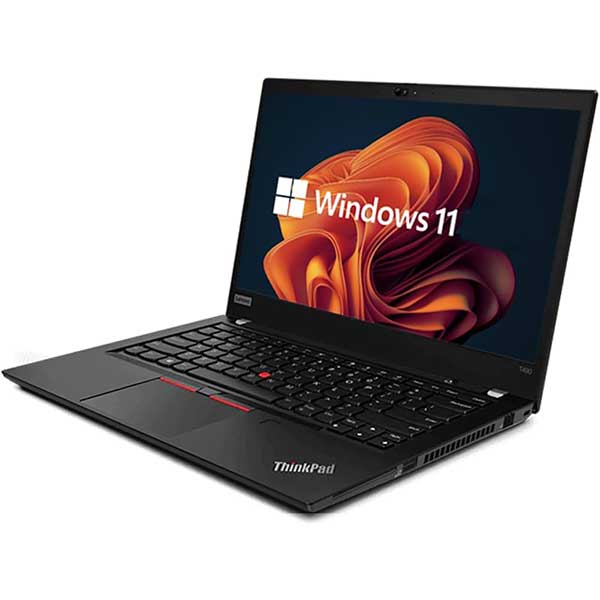
A cheap laptop that freezes during class is not a bargain. For families trying to meet a school device list without blowing the term budget, the best laptop for school BYOD is usually the one that starts fast, lasts the full day, survives being carried around, and handles schoolwork without fuss.
That sounds obvious, but BYOD buying often goes wrong in two ways. Some parents buy the cheapest new machine they can find and end up with weak performance, poor battery life, and flimsy build quality. Others overbuy and pay for gaming-level specs a student simply will not use. The smarter middle ground is a dependable, business-grade laptop with the right features for school, not the flashiest ones on the shelf.
What makes the best laptop for school BYOD?
A BYOD laptop has a tougher job than a home laptop. It gets packed into a bag every day, opened and closed repeatedly, used across multiple classes, and expected to stay reliable through assignments, research, video calls, and browser-heavy learning platforms. That means practical performance matters more than showroom appeal.
For most primary, intermediate, and secondary students, the essentials are clear. The laptop should have enough processing power for web apps, Microsoft Office, Google Workspace, streaming lessons, and light multitasking. It should have battery life that comfortably covers the school day, a screen size that is easy to carry, and a keyboard that makes long typing sessions manageable.
Durability matters as much as raw speed. This is one reason ex-lease business laptops are worth serious attention. Models built for office fleets from Dell, HP, and Lenovo are designed for daily use, not occasional weekend browsing. Hinges, keyboards, chassis strength, and cooling are often better than what you get in low-cost consumer laptops.
Specs that actually matter for students
A school BYOD list can make buying feel more technical than it needs to be. In practice, a few core specs do most of the heavy lifting.
An Intel Core i5 or equivalent processor is a safe choice for most students. An i3 can be fine for light use, especially in younger year levels, but it leaves less headroom as school workloads grow. A student may start with basic classroom apps and end up using dozens of browser tabs, Teams calls, spreadsheets, and cloud software at once.
Memory is another area where going too cheap causes trouble later. For current school use, 8GB of RAM is the sensible minimum. It keeps the machine responsive when several apps are open, and it reduces the lag that makes study frustrating. If the budget allows, more memory can help with longer-term use, but 8GB is the practical baseline.
Storage should be SSD, not an old-style hard drive. An SSD makes a laptop feel quick from the moment it powers on. Files open faster, updates install more smoothly, and the whole device feels less sluggish. For school use, 256GB is usually enough unless the student stores large media files locally.
Screen size depends on the student and the commute. A 13-inch or 14-inch laptop is often the sweet spot for BYOD because it balances portability and usability. A 15-inch model can be more comfortable for typing and split-screen work, but it is heavier in the bag. If a student walks, catches public transport, or carries sport gear as well, smaller can make more sense.
Windows, Chromebook, or something else?
This depends heavily on the school. Some schools are built around Google Classroom and browser-based learning, while others expect full Windows compatibility for specific software, exams, or subject work.
Chromebooks can suit younger students and schools with a mostly cloud-based setup. They are simple, fast, and often affordable. The trade-off is flexibility. If the school requires Windows applications or more traditional desktop software, a Chromebook may become limiting.
For many families, a Windows laptop is the safest all-round option. It covers a wider range of school requirements and remains useful beyond the classroom. That is especially relevant for older students who may need standard productivity software, better multitasking, or compatibility with printers, external displays, and specialist applications.
Apple laptops can also work well in the right setting, but they are often harder to justify on value alone for BYOD unless the school specifically supports that environment and the budget is generous.
Why refurbished business laptops make sense
The phrase refurbished still gives some buyers pause, but there is a big difference between random second-hand gear and professionally refurbished ex-lease business hardware. The latter is often one of the strongest value plays for school BYOD.
A refurbished business laptop can give a student better build quality, a stronger processor, and more reliable day-to-day performance than a brand-new budget laptop at the same price. That is the key point. You are not just saving money. You are often stepping into a better class of machine.
Business-grade laptops are built for offices where reliability is non-negotiable. They are designed to handle frequent use, travel, docking, long workdays, and repeated charging cycles. Those same strengths translate well to school life.
There are trade-offs, and it is better to be clear about them. A refurbished unit may have minor cosmetic wear. The design might not look as modern as the latest retail models. Battery health can vary depending on the machine and refurbishment process. That is why it matters where you buy. Professionally refurbished laptops with tested components, clear specs, and warranty support are a very different proposition from taking a punt on an unknown seller.
Best laptop for school BYOD by student type
The best fit changes depending on year level and workload.
For a younger student, portability and simplicity usually matter more than top-end performance. A 13-inch or 14-inch laptop with 8GB RAM, SSD storage, and a solid keyboard will handle classroom apps, writing tasks, and online learning comfortably.
For a secondary student, especially from Year 9 onward, it is worth buying with a bit more headroom. More subjects, more browser tabs, more file management, and more video-based learning place greater demand on the device. A quality Windows business laptop with an Intel Core i5, 8GB RAM, and SSD storage is a dependable choice that should stay useful for several school years.
For senior students, subject choice matters. A student focused on essays, research, and general classroom work does not need high-end graphics. A student doing digital media, design, or heavier software-based coursework may benefit from higher specifications and a larger screen. In those cases, check the school requirements carefully before buying.
What parents should check before purchasing
The first job is to confirm the school’s BYOD requirements. Not every school uses the same platform, and some have specific rules around operating systems, minimum specs, or approved device types. The best laptop for school BYOD is only the best if it actually matches those requirements.
After that, look at the practical details. Does it have a webcam and microphone that work well for remote learning or online catch-ups? Does it include Wi-Fi strong enough for modern home and school networks? Are there enough ports for a mouse, charger, or external monitor at home?
Battery life is worth paying close attention to, but avoid treating advertised figures as gospel. Real-world battery life depends on brightness, app usage, background updates, and the age of the battery. If all-day school use is essential, ask for realistic expectations rather than relying on marketing numbers.
Weight is another one people notice only after the first week. A durable 14-inch business laptop can be ideal, but if it is too heavy for the student to carry comfortably every day, that matters. There is always a balance between toughness, size, and portability.
Value beats cheap every time
The most expensive option is not automatically the best, and the cheapest option often becomes expensive when it needs replacing too soon. Good BYOD buying is about value over the full life of the device.
That is where professionally refurbished hardware stands out. For many New Zealand families, it offers a practical way to get school-ready performance from trusted enterprise brands without paying new-device prices. A properly selected ex-lease laptop can cover school tasks comfortably, hold up better physically, and give better day-to-day reliability than many low-end retail models.
At NZ Laptop Wholesale, that value-led approach makes particular sense for parents comparing school devices. The focus is not on flashy features. It is on tested, fit-for-purpose machines that do the job well and keep costs sensible.
If you are choosing a BYOD device this term, think less about marketing labels and more about how the laptop will perform on an ordinary Tuesday at school. A reliable machine that starts quickly, types comfortably, lasts through class, and handles schoolwork without drama is usually the right buy.


