










TL;DR: How Much Computer Memory You Need
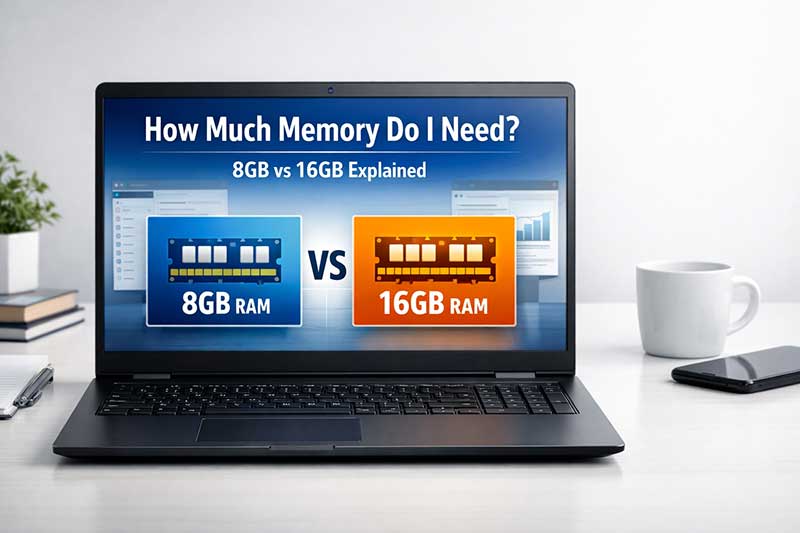
For most everyday users, 8GB RAM is a sensible starting point for web browsing, email, documents, study and general home or office use. If you regularly multitask, use lots of browser tabs, work with larger files or want the computer to feel smoother for longer, 16GB RAM is usually the better choice.
Quick answer: Choose 8GB RAM for basic everyday use, 16GB RAM for smoother multitasking and work use, and more than 16GB only if you run demanding software like design, editing, engineering or virtual machine tools.
RAM affects how many apps, browser tabs and background tasks your computer can handle at once. It will not fix every speed issue on its own, but paired with an SSD and a decent processor, the right amount of memory can make a big difference to day-to-day performance.
If you are shopping for a laptop or desktop, one of the most common questions is simple: how much memory do I actually need? In most cases, what people really mean is RAM rather than storage space.
For most NZ home users, students, parents buying for school, and small business users, the real decision usually comes down to 8GB vs 16GB. Those are the two most common options we see, and for good reason. One is often enough for everyday use, while the other gives you a more comfortable experience if you like to multitask or want extra breathing room for the future.
In this guide, we will explain what memory does, when 8GB is enough, when 16GB is the better buy, and how to choose the right amount for the way you actually use your computer.
First, what does “memory” mean?
When people talk about computer memory, they usually mean RAM (Random Access Memory). RAM is the short-term working space your computer uses while it is running apps, loading websites, switching between tabs, and handling your everyday tasks.
It is different from storage. Storage is where your files live long-term, such as your documents, photos, and installed programmes. RAM is more about how comfortably and smoothly your computer can work while you are using it.
RAM vs storage: quick comparison
| Type | What it does | Simple example |
|---|---|---|
| RAM / Memory | Helps your computer run apps and multitask smoothly | Like your desk space while you work |
| Storage / SSD | Holds your files, Windows, apps, and saved data | Like your filing cabinet or cupboard |
How much RAM do most people really need?
For most buyers today, 8GB is the practical minimum for a Windows laptop or desktop, while 16GB is the sweet spot if you want a smoother experience with more tabs, more apps, and a bit more future-proofing.
If you are mainly browsing the web, checking emails, doing school work, using Microsoft Office, attending online classes, or streaming video, 8GB may still be perfectly fine. But if you tend to keep lots of browser tabs open, use multiple programmes at once, or want your machine to feel less strained over time, 16GB is usually the better choice.
8GB vs 16GB: which one should you choose?
| Memory | Best for | What to expect |
|---|---|---|
| 8GB RAM | Students, light home use, web browsing, email, Word, spreadsheets, streaming, online learning | Good for everyday tasks if you are not pushing too many apps or tabs at once |
| 16GB RAM | Busy multitaskers, work-from-home users, small business, heavier browsing, larger spreadsheets, Zoom or Teams with other apps open | Smoother and more comfortable, especially if you keep many things open at once |
When 8GB RAM is usually enough
8GB is still a sensible option for plenty of people. If your computer use is fairly straightforward, you may not need to spend extra on more memory.
- Browsing the web and using email
- Word processing and basic school work
- Google Docs, Microsoft Office, and cloud-based apps
- YouTube, Netflix, and general streaming
- Online banking, shopping, and everyday home tasks
- Basic remote learning or homework use
For parents buying a student laptop, 8GB is often enough for common BYOD tasks, especially if the student mostly uses browser-based tools and standard schoolwork apps. It can also suit seniors or light users who want something simple, responsive, and affordable.
When 16GB RAM is the better choice
16GB is where many buyers end up happiest, especially if they use their computer heavily throughout the day. You do not need to be doing specialist creative work to notice the benefit. Even normal day-to-day use can feel better when you have more headroom.
- Keeping lots of browser tabs open
- Running Zoom, Teams, or Meet while also using Office apps
- Using accounting software, business tools, or CRMs
- Working across spreadsheets, PDFs, email, and browser tabs together
- Light photo editing or more demanding multitasking
- Wanting a machine that feels less cramped over time
For many small business users, work-from-home setups, and busy family laptops, 16GB is the safer all-round option. It gives you more flexibility without needing to overthink every tab or app you open.
Our practical recommendation
If you want the short version, this is it:
- Choose 8GB if you are on a tighter budget and your use is mostly everyday tasks.
- Choose 16GB if you multitask a lot, want a smoother experience, or plan to keep the computer for a while.
That is why so many of the refurbished laptops and desktops we stock fall into these two categories. They suit the needs of most real-world buyers without paying for memory levels many people will never use.
Quick checklist: what kind of user are you?
8GB is probably right for you if:
- You mainly use email, web browsing, and Office apps
- You do school work, homework, or basic admin
- You usually keep only a moderate number of tabs open
- You want a lower-cost option that still handles everyday tasks well
16GB is probably right for you if:
- You often multitask across several apps at once
- You use your computer for work and need it to stay responsive
- You keep many tabs open in Chrome or Edge
- You want more breathing room for the next few years
- You would rather buy once and not feel limited later
What happens if you do not have enough RAM?
When a computer runs low on RAM, it can start to feel sluggish. Apps may take longer to switch between, too many browser tabs can slow things down, and the whole system may feel less responsive than it should.
This does not always mean the computer is broken. It may simply mean you are asking more from it than its current memory allows comfortably.
Does more RAM always mean a faster computer?
Not always. More RAM helps when your computer is running out of working space, but it is only one part of the overall picture. Processor generation, SSD speed, Windows condition, battery health in laptops, and general hardware quality all matter too.
A well-chosen business-grade ex-lease machine with an SSD and the right amount of RAM will often feel far better than a cheaper, lower-quality unit with flashy specs on paper. That is one reason many buyers choose professionally refurbished business models in the first place.
Can RAM be upgraded later?
Sometimes yes, sometimes no. Some laptops allow memory upgrades, while others have RAM soldered onto the motherboard. Desktops are often more upgrade-friendly, but it depends on the specific model.
If upgradeability matters to you, it is worth checking before you buy. For some people, spending a little more upfront on 16GB is simpler than planning an upgrade later.
Should you avoid 4GB RAM?
For most Windows users today, yes. While 4GB may still technically run basic tasks, it can feel limiting very quickly once Windows updates, browser tabs, and modern apps are involved. For a better everyday experience, 8GB is generally the practical starting point.
Buying tip: match the memory to the job
The best computer is not the one with the biggest number beside every spec. It is the one that fits the way you actually use it.
If you are buying for a child, a home office, a study setup, or a small business, try to think about the daily workload rather than the marketing. In many cases, 8GB is enough. In plenty of others, 16GB is the smarter buy and gives you a noticeably easier day-to-day experience.
Quick summary
- RAM is your computer’s short-term working memory
- Storage and memory are not the same thing
- 8GB is suitable for many everyday users
- 16GB is better for multitasking and work-heavy use
- For most buyers today, the real choice is 8GB vs 16GB
- A balanced system matters more than one flashy spec
Safety and buying notes
- Always back up important files before upgrading hardware or reinstalling Windows
- Do not assume every laptop can have its RAM upgraded later
- Check whether the machine has an SSD as well as enough memory, because both affect everyday performance
- If you are unsure, ask about your real usage rather than buying based on guesswork
Need help choosing?
If you are unsure whether 8GB or 16GB is right for you, we are happy to help. At NZ Laptop Wholesale, we focus on professionally refurbished, business-grade ex-lease computers that are cleaned, tested, and ready for real-world use. We ship NZ-wide, offer real local support, and every machine is backed by our warranty.
Sometimes the right answer is a budget-friendly 8GB machine. Sometimes it is worth stepping up to 16GB. Either way, choosing the right fit is more important than chasing specs you may never use.
Related guides


