










USB-C Dual Monitor Bundles NZ
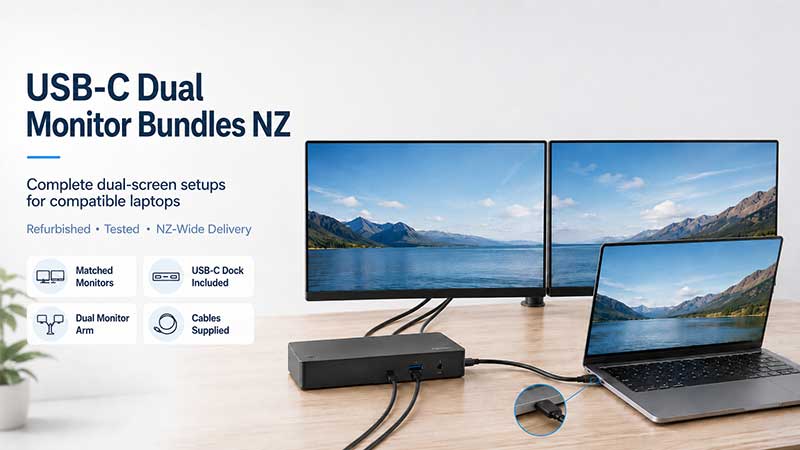
Turn your compatible laptop into a comfortable dual-screen workstation with one of our complete USB-C dual monitor bundles. These practical packages bring together two matched monitors, a USB-C docking station and the required display and power cables, with selected bundles also including a new dual monitor desk-mount arm.
They are ideal for working from home, business administration, accounts, study, research and everyday multitasking. Instead of trying to match monitors, docks and cables yourself, you can choose a ready-to-go package prepared by our Auckland team and shipped securely throughout New Zealand.
Shop USB-C Dual Monitor Bundles
Browse our currently available USB-C dual monitor packages below. Check the individual product page for the exact monitor models, screen sizes, docking station, mounting option and cables supplied with each bundle.
Computer Monitors
Computer Monitors
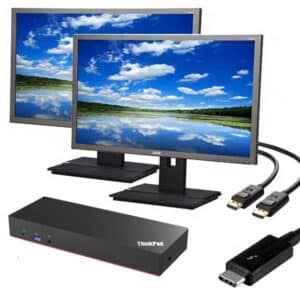
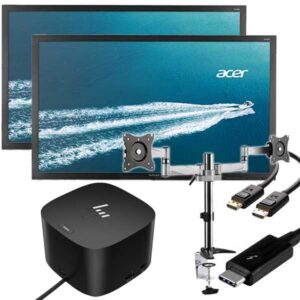
Dual Acer 24″ Monitors with New Desk Mount Arms & USB-C Dock
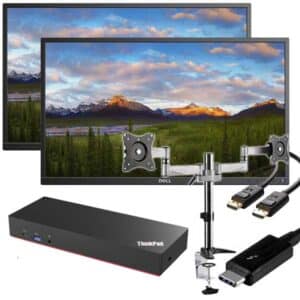
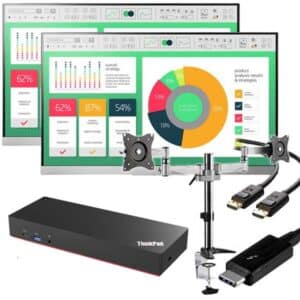
A Simple Dual Monitor Setup for Your Laptop
A dual monitor bundle gives you more usable screen space without taking away the portability of your laptop. When you are at your desk, connect the docking station and use both external monitors. When you need to leave, disconnect the laptop and take it with you.
This type of setup is particularly useful when you regularly work across several programs or documents. You might keep emails or online meetings open on one screen while working on spreadsheets, accounts, web pages or documents on the other.
How the setup connects
- Monitor one connects to the docking station using its supplied display cable.
- Monitor two connects to another display output on the docking station.
- Both monitors connect to power using their supplied power cables.
- The docking station connects to your compatible laptop using the main USB-C cable.
- Your display settings can then be configured to extend the desktop across both monitors.
For detailed connection instructions, read our guide on how to set up dual monitors with a docking station.
What Is Included?
The exact equipment varies between products, so always check the individual bundle description before ordering. A typical USB-C dual monitor bundle may include:
- Two matching refurbished business-grade monitors
- A USB-C docking station suitable for running two external displays
- Two compatible monitor display cables
- Power cables for both monitors
- A USB-C cable for connecting the dock to the laptop
- A new dual monitor desk-mount arm with selected packages
Some bundles use 22-inch monitors for a compact setup, while others include 23-inch or 24-inch screens for a larger working area. Each product page shows the exact screen size, resolution, monitor model, dock and mounting equipment included.
Will a USB-C Dual Monitor Bundle Work with My Laptop?
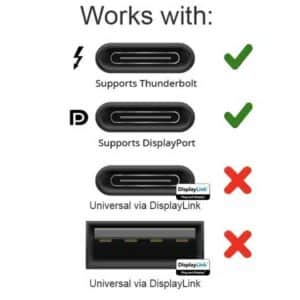
The USB-C plug fitting into your laptop does not automatically mean the laptop can run external monitors. The laptop’s USB-C port normally needs to support DisplayPort Alt Mode, Thunderbolt or another display technology supported by the docking station.
Laptop charging is also a separate feature. A USB-C port may support monitors without accepting power, while some laptops require more charging wattage than a particular dock can provide. The laptop, docking station, USB-C port and cable must all support the features you expect to use.
Before ordering: check your laptop’s exact model rather than relying only on the shape of its USB-C port.
Our USB-C docking station compatibility guide explains DisplayPort Alt Mode, Thunderbolt, Power Delivery and the USB-C symbols to look for.
Unsure about your laptop? Contact our Auckland team with the brand and exact model number. We can help you determine whether one of these bundles is likely to suit it.
Who Are These Bundles Best For?
Work-from-home users
Keep email, communication tools or video meetings visible on one screen while using the second screen for your main work. A desk-mounted bundle can also free up more usable space than two separate monitor stands.
Students and researchers
Use one display for research, course material or an online class while writing notes or assignments on the other. It is a practical option for study desks where repeatedly switching between windows becomes frustrating.
Accounts and administration
Compare invoices, spreadsheets, customer records and online systems without constantly minimising and reopening windows. Two displays can make routine office tasks easier to organise.
Small businesses
USB-C dual monitor bundles are useful for creating consistent workstations for staff without buying each screen, dock, cable and mounting component separately. Contact us if you need several matching packages for an office setup.
Hot desks and shared workstations
A compatible USB-C docking station can provide a convenient connection point for supported laptops. Staff can connect their laptop to the workstation when they arrive and disconnect it when they leave.
Why Choose a Bundle Instead of Separate Components?
Building a dual monitor setup one component at a time can become confusing. The monitor inputs must match the docking station outputs, the dock must support two displays, suitable cables are required, and the laptop itself must be compatible.
A bundle simplifies the hardware side by grouping the main components into one package. You still need to confirm laptop compatibility, but you do not have to independently source two monitors, a suitable dock, display cables and mounting equipment.
- Matched monitors for a more consistent workspace
- A docking station selected for dual display use
- Required monitor and power cables listed with the product
- Selected packages with a new dual monitor desk arm
- One order instead of several separate purchases
- Local help checking laptop and dock compatibility
Dual Monitor Desk-Mount Arms
Many of our complete bundles include a new clamp-style dual monitor desk arm. Mounting the monitors above the desk can create more usable work space, make screen positioning easier and give the workstation a cleaner appearance.
Clamp-style arms are not suitable for every desk. The desk needs a strong, accessible rear edge with enough room for the clamp to fit securely. Desks fixed directly against a wall, glass desks and desks without a usable rear overhang may not be suitable.
Read our dual monitor desk-mount arm guide before ordering a bundle that includes a clamp-mounted arm.
Professionally Prepared in Auckland
Our refurbished monitors and business-grade IT equipment are checked and cleaned before sale. We focus on practical ex-lease equipment that offers good everyday value for New Zealand homes, students and businesses.
- Professionally tested and cleaned equipment
- Business-grade ex-lease monitors and docking hardware
- Secure courier packaging
- Delivery available throughout New Zealand
- Auckland pickup available once your order is ready
- Backed by our warranty
- Real local support from our Auckland team
See our freight information for delivery details, or arrange collection from our Auckland warehouse once your order has been prepared.
Frequently Asked Questions
Can I connect two monitors through one USB-C cable?
Yes, when the laptop, USB-C port and docking station all support two external displays. Both monitors connect to the dock, and the dock connects to the laptop using its main USB-C cable.
Does every USB-C laptop support dual monitors?
No. Some USB-C ports support data only, while others support DisplayPort Alt Mode, Thunderbolt, charging or a combination of these features. Check the exact laptop model before ordering.
Will the docking station charge my laptop?
It depends on the laptop and docking station. The dock must provide USB-C Power Delivery, the laptop must accept charging through its USB-C port, and the available charging wattage must be suitable for the laptop.
Can I use the laptop screen as a third display?
Often you can use the laptop’s built-in screen alongside the two external monitors. However, the total number of displays supported depends on the laptop, graphics hardware, operating system and docking station.
Do the bundles include all the cables?
Each product page lists the exact cables and accessories supplied. Our complete packages normally include the required monitor display cables, monitor power cables and the main USB-C connection cable, but you should check the specific listing before ordering.
Are the monitors supplied with their original stands?
Bundles supplied with a dual monitor desk-mount arm may not include the original factory monitor stands unless the product listing specifically says they are included.
Can you check whether my laptop is compatible?
Yes. Send us the laptop brand and exact model number through our contact page. A clear photo of the laptop’s ports can also be helpful, although the model number is normally the best starting point.
Build a Better Dual-Screen Workspace
Choose a USB-C dual monitor bundle for a straightforward way to add more screen space to a compatible laptop. Whether you are setting up a home office, study area, accounts desk or small business workstation, our bundles provide a practical alternative to sourcing every component separately.
Looking for a different connection type? Browse all our dual monitor bundles or view our range of laptop docking stations.


