

Budget Laptops Under $500 NZ

If you need a practical laptop without spending big, our range of budget laptops under $500 is a smart place to start. These refurbished and ex-lease laptops are ideal for everyday jobs like browsing the web, email, study, online learning, documents, video calls and general home or work use.
At NZ Laptop Wholesale, we focus on business-grade ex-lease laptops that have been tested, cleaned and prepared for reuse. That means you can often get a better-quality machine than many cheap new entry-level laptops, while keeping the price sensible.
Our available stock changes regularly, so the products shown on this page are updated dynamically as laptops become available.
Who Are These Budget Laptops Best For?
A laptop under $500 is not designed to be a high-end gaming machine or a heavy video editing workstation. But for many everyday users, it can be more than enough.
- Students who need a laptop for school, study or online learning
- Parents looking for an affordable BYOD or homework laptop
- Home users who mainly browse, email, shop online and use documents
- Small businesses needing practical extra laptops for admin or staff
- Work-from-home users who need a basic Windows laptop for everyday tasks
- Anyone replacing an older or unreliable computer without overspending
Quick Summary: What to Expect Under $500
Budget Laptop Checklist
- Good for: web browsing, email, documents, study, video calls and everyday use
- Look for: SSD storage, enough memory, Windows 11 compatibility and a practical screen size
- Be realistic: budget laptops are not ideal for gaming, CAD, heavy design work or advanced video editing
- Buying refurbished: can give you better business-grade build quality for the money
- NZLW advantage: tested, cleaned, backed by our warranty and supported by real local people
Refurbished vs Cheap New Laptops Under $500
When shopping at this price point, it is worth comparing a refurbished business laptop against a cheap new consumer laptop. A low-cost new laptop may look appealing, but it can sometimes come with very basic processors, limited storage, lower build quality or slower performance.
A refurbished ex-lease laptop may have originally been built for business use, which often means a stronger chassis, better keyboard, more serviceable design and more practical performance for everyday work.
| Option | Typical Strengths | Things to Watch |
|---|---|---|
| Refurbished business laptop | Better build quality, practical performance, business-grade design, often better value for the money | May show minor cosmetic wear depending on grade and previous use |
| Cheap new consumer laptop | Brand new condition, current retail packaging, simple entry-level option | May use slower components, limited storage, lighter build quality or less upgrade flexibility |
| Second-hand private sale | Sometimes cheaper upfront | Usually no proper testing process, limited support, unknown history and greater risk |
What Specs Matter Most in a Budget Laptop?
You do not need to understand every technical detail to make a good choice. For most people buying a laptop under $500, a few key specs matter more than the rest.
SSD Storage
An SSD makes a big difference to how fast a laptop feels. It helps Windows start faster, apps open quicker and general use feel more responsive. For everyday users, SSD storage is usually more important than having a large but slower hard drive.
Memory / RAM
Memory helps your laptop run multiple tasks at once. If you tend to keep several browser tabs open, use Microsoft Office, join video calls or switch between apps, having enough RAM helps keep things smooth.
Processor Generation
The processor matters, but it is not the only thing to look at. A sensible business-grade Intel Core i5 laptop with an SSD can often feel better in day-to-day use than a newer but very low-powered entry-level machine.
Screen Size
Smaller laptops are easier to carry, while larger laptops give you more screen space. For students and people on the move, 12 to 14 inches is often practical. For home use, study desks or admin work, a 14 to 15.6 inch laptop can be more comfortable.
Common Uses for Laptops Under $500
Budget laptops are best suited to normal everyday computing. They are popular because they cover the tasks most people actually do, without paying for extra performance they may never use.
- Writing documents and assignments
- Using email, webmail and cloud apps
- Browsing the internet
- Watching YouTube, Netflix and online learning videos
- Using Microsoft Office or free office alternatives
- Joining Zoom, Teams or Google Meet calls
- Online banking, shopping and general admin
- Basic small business tasks and point-of-sale support roles
What a Budget Laptop Is Not Ideal For
We would rather be upfront about expectations. A laptop under $500 can be excellent value, but it is not the right tool for every job.
- Modern gaming
- Heavy video editing
- Advanced design, CAD or 3D modelling
- Large photo editing workloads
- Running lots of demanding apps at the same time
- Specialist software with high hardware requirements
If you need a laptop for heavier work, it may be worth looking at a higher-spec refurbished laptop instead. Spending a little more can make sense if performance is important to you.
Why Buy a Budget Laptop from NZ Laptop Wholesale?
NZ Laptop Wholesale is based in Auckland and supplies refurbished laptops, desktops, monitors and accessories to customers throughout New Zealand. We are real people selling real products, and we understand that many customers simply want honest advice and a computer that does the job.
- Professionally tested and cleaned: our refurbished laptops are checked before sale
- Business-grade ex-lease options: practical machines originally built for work environments
- NZ-wide courier delivery: securely packed and sent nationwide
- Local support: you can contact a real NZ-based team if you need help
- Backed by our warranty: added reassurance when buying refurbished
Tips Before You Choose
Before buying, think about how the laptop will actually be used. A student carrying it every day may value a smaller size and better portability. A home user may prefer a larger screen. A small business may care more about reliability, Windows compatibility and docking station support.
- Choose SSD storage where possible for better everyday speed
- Check the screen size suits the person using it
- Consider whether you need Windows 11 compatibility
- Allow for accessories such as a mouse, laptop bag, monitor or docking station if needed
- Ask us if you are not sure which laptop best suits your use case
Important Note About Stock
Because we sell refurbished and ex-lease laptops, exact models and quantities change often. If you see a laptop that suits your budget and needs, it may not stay available for long.
If this page does not currently show the right option, check back soon or contact us for help. We may be able to suggest a suitable alternative based on what has recently arrived or what is being prepared.
Need Help Choosing?
If you are not sure which laptop to choose, get in touch with NZ Laptop Wholesale. Tell us what you need it for, your budget, and whether it is for home, school, study or work. We can help point you toward a practical refurbished laptop that makes sense for your needs.
Recommended products
-

The $99 Chromebook
$99.00 inc gst -
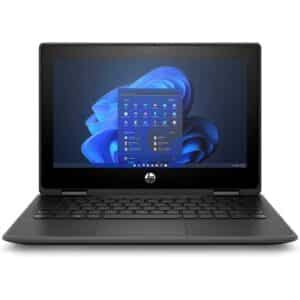
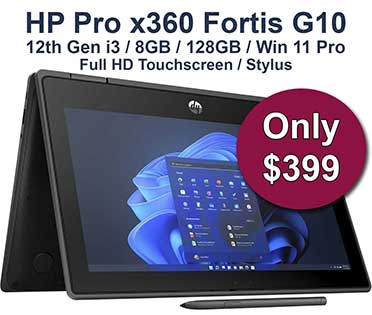
HP Pro x360 Fortis G10 | 11.6″ Touchscreen Laptop + Stylus | Win 11
Original price was: $579.00.$399.00Current price is: $399.00. inc gst -
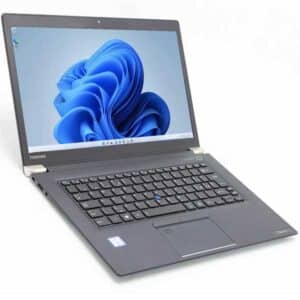
Toshiba Tecra X40-E | 14″ Touchscreen | 8th Gen i5 | 8GB | 256GB SSD | Windows 11 Pro
Original price was: $519.00.$489.00Current price is: $489.00. inc gst -
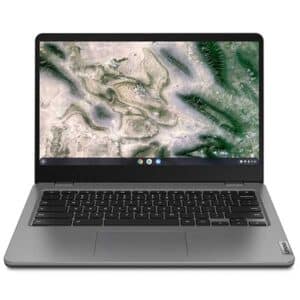
Lenovo Chromebook 14e G2 – Updates until 2031
$275.00 inc gst -
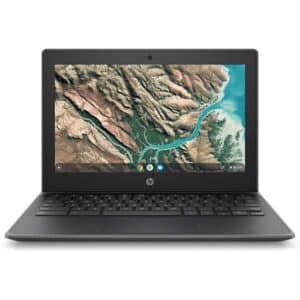
HP Chromebook 11 G8 EE – 11.6″ Rugged Student Laptop | ChromeOS Updates to 2029 | Refurbished NZ
Original price was: $219.00.$189.00Current price is: $189.00. inc gst -
Dell Latitude 5300 2-in-1 Touchscreen – i5 8th Gen, 8GB, and 256GB M.2, Win 11 Pro
Original price was: $519.00.$499.00Current price is: $499.00. inc gst